
Forms
Forms to collect the details your team needs
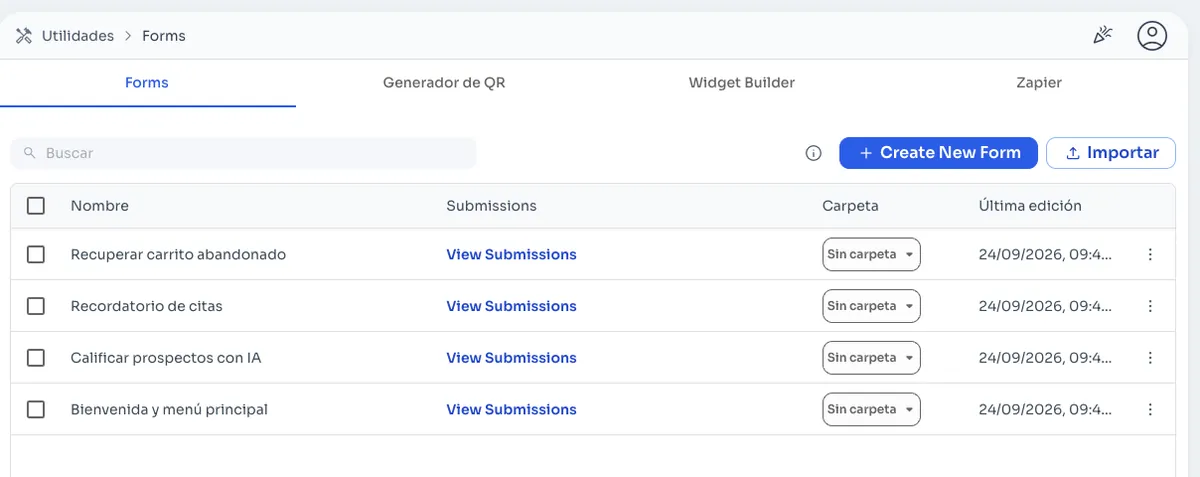
A form helps you collect details in an orderly way from people who message you on WhatsApp, without copying answers from a chat into a spreadsheet. In ChatSales you create your forms from Utilities and review each one's submissions in its own list.
How it works
- Create a new form from Utilities.
- View the submissions for each form.
- Organize your forms in folders.
- Import forms you already have.
- See when each one was last edited.
Ideas for using them
- For example, qualifying a lead before handing it to a sales rep.
- Collecting shipping details for an order.
- Receiving a quote request with everything you need.
All in Utilities
Forms live in Utilities, next to the QR generator, the Widget Builder and Zapier. From there you prepare what you need to attract and organize your leads.
QR generator →Frequently asked questions
Do I need to know how to code?
No. You create and manage your forms from the ChatSales dashboard.
Where do I see the submissions?
Each form has its own list of submissions under Utilities, in Forms.
Can I organize my forms?
Yes. You keep them in folders and search for them by name.
You might also like
AutomationsAutomationsAutomate WhatsApp with message flows, keyword replies and after-hours replies. Start from a template or describe the flow to Copilot.DirectoryContact directoryYour WhatsApp contact database in one directory: import contacts from CSV, tag them, assign them to your team, filter and export whenever you need.QR generatorQR generatorGenerate your number's WhatsApp QR code and wa.me link in ChatSales, with a pre-filled message, background photo and caption, ready to download.
Start selling on chat today
Create your account and connect your first channel in minutes.