
Your WhatsApp contact database, organized and ready to sell
In the ChatSales Directory every contact has their number, tags, assigned team member, the channel they came from and the date of their last contact. You import your contacts from a CSV file, and everyone who messages you is saved with their conversation.
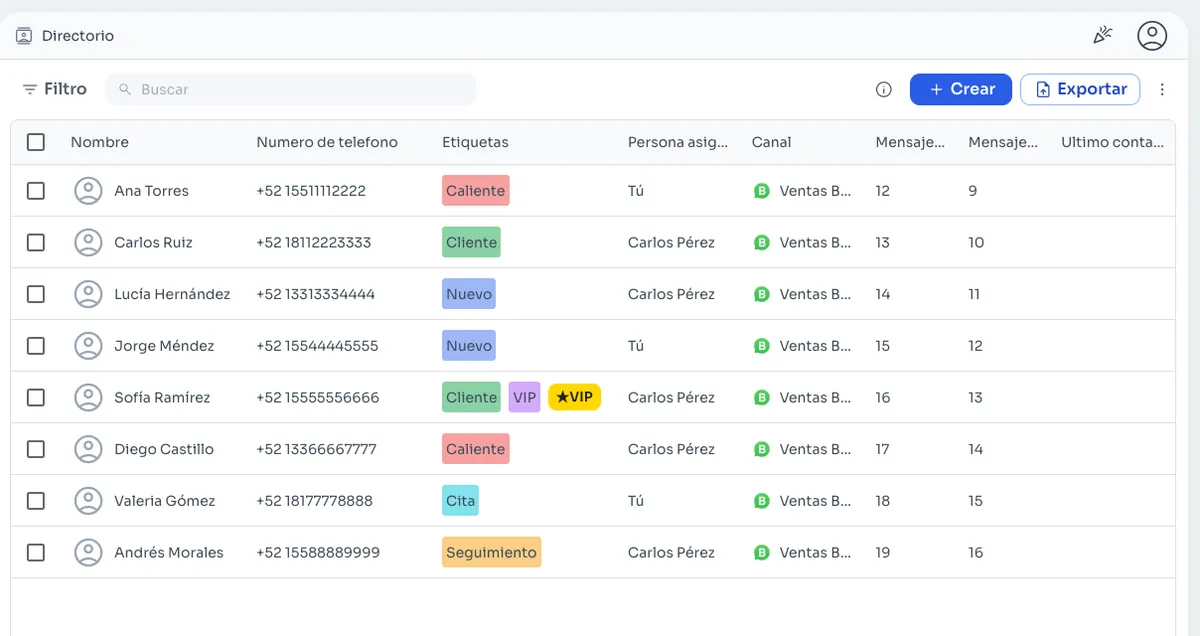
Everything about each customer in one row
- Name and number with country code.
- Tags, for example New, Customer or VIP.
- The team member assigned.
- The channel they came from.
- Messages exchanged and last contact.
Import your contacts from CSV
If your customers live in a spreadsheet or another tool today, export them to CSV and import them into ChatSales with their tags. If you are coming from another platform, we help you move your contacts and pipelines.
Switch and save 50% →Find who you are looking for
Search by name or number and use filters to see, for example, only your VIP customers or one sales rep's contacts. Select several at once and export your directory whenever you need.
From list to broadcast
Use your tags to choose who receives a broadcast of Meta-approved templates, always to contacts who agreed to receive your messages.
Broadcasts →Frequently asked questions
Can I import my contacts from Excel?
Yes. Save your sheet as a CSV file and import it into ChatSales with its tags.
Can I export my contacts?
Yes. You export your contacts from the Directory whenever you want. Your data is yours.
Do Instagram and Messenger contacts show up too?
Yes. The Directory shows the channel each contact came from.
Can I send bulk messages to my imported contacts?
Yes, with broadcasts of Meta-approved templates, and only to contacts who agreed to receive your messages. That protects your number's quality rating.
You might also like
Start selling on chat today
Create your account and connect your first channel in minutes.