
Your Facebook Page's messages, inside your CRM
ChatSales connects to Facebook Messenger through Meta's official integration. Your Page's messages land in the same inbox as WhatsApp and Instagram, your AI replies at any hour and every lead enters your sales pipeline.
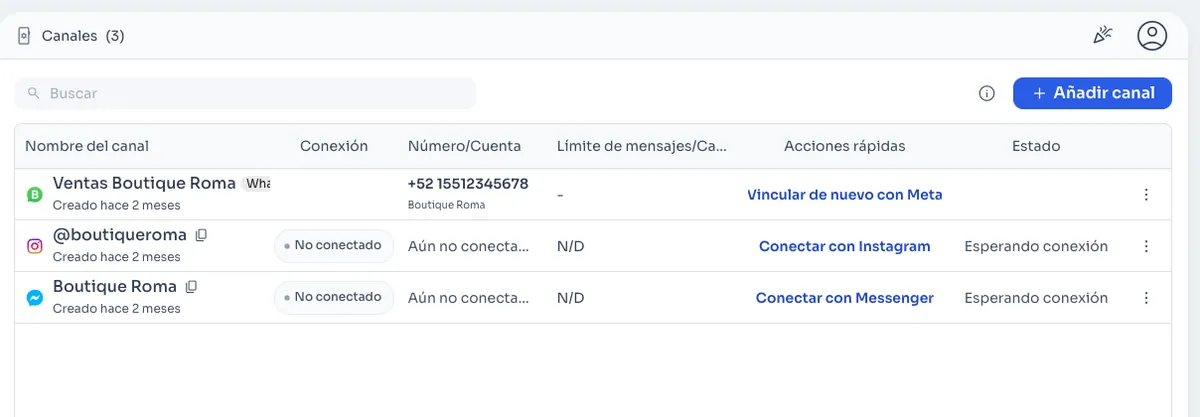
How to connect it
- Go to Channels and click Add channel.
- Choose the official Facebook Messenger integration.
- Authorize the connection with your Meta account.
- Your Page appears in Channels with its connection status.
All your channels in one place
In Channels you see WhatsApp, Instagram and Messenger together, each with its status. Your team handles everything from the same inbox and every conversation has an owner.
Shared inbox →The 24-hour rule
Messenger lets you reply freely within 24 hours of the customer's last message. That is why replying fast, with AI, makes the difference.
AI assistant →From message to sale
Every Messenger conversation can be tagged, assigned and moved through your pipeline like any WhatsApp chat.
Sales pipelines →Frequently asked questions
What do I need to connect Messenger?
A Facebook Page for your business and admin access to it with your Meta account.
Can I automate replies on Messenger?
Yes, with the AI assistant and with flows on the channels that support them.
Do Messenger messages count as active chats?
Yes. Every conversation with activity counts, whatever the channel.
You might also like
Start selling on chat today
Create your account and connect your first channel in minutes.